Visualizzazione post con etichetta tablature. Mostra tutti i post

mercoledì 5 marzo 2008

Create your own files for your Fretlight Guitar

With this tip you will be able to see your Fretlight playing your own tablatures or already existing ones.
For further information about Fretlight guitar you can read here.


  • You have to download and buy Guitar Pro:
    http://www.guitar-pro.com/

  • Create your own "Guitar Pro File" or open an existing one (it imports as well PowerTab files)

  • Identify the track you are interested in (i.e. the track you want to be played by your Fretlight)

  • Duplicate this track (you have now 2 identical tracks, the original track will be used to play the MIDI notes with M-Player)

  • Select the second track (the copied one)
  • Click F6 button (or "Track -> Properties" from the toolbar)

  • It will open following dialog: (click the picture to see it in full size)
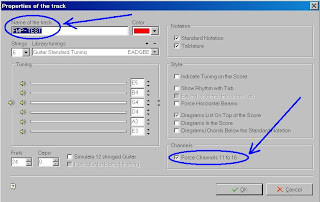
  • Important: name the track like this "FMP - " + "whatyouwant" (ex. "FMP - Track1")

  • Check the flag "Force Channels 11 to 16"
  • Click OK

  • Export to MIDI


That's it!

Play your MIDI exported file with M-Player, you will hear the sound and see on your Fretlight the notes lighted on in real time.


[Added: 14 July 2008]
Some people reported to me to receive error messages from M-Player similar to this: "Unable to load file.Automation error. The object invoked has disconnected from its clients".

I too experienced this kind of problems using latest M-Player version with Vista.

It seems it really depends on M-Player version.
Anyway, using Win2000 or WinXP with M-Player v1.2.5214 everything works fine.

If you have Win2000 or WinXP you can download this M-Player specific version from here:
http://www.francescograssi.com/public/download/fretlight/M-PlayerSetup_1.2.5214.exe

But if you want to avoid to downgrade M-Player, you can try this tip before:
  • once you have your MIDI file exported, open it with a pure MIDI editor and save it again as MIDI


It has been reported that this tip should be able to fix the problem.


Francesco Grassi

venerdì 22 febbraio 2008

Crea i tuoi file per la Fretlight Guitar

This post contains both Italian + English text.
If you want the post just only in English, please go here.


Con questo suggerimento potrete fare in modo che la vostra chitarra Fretlight visualizzi sulla tastiera le vostre tablature oppure tablature già esistenti.
Per maggiori informazioni sulla chitarra Fretlight date un'occhiata qui.

With this tip you will be able to see your Fretlight playing your own tablatures or already existing ones.
For further information about Fretlight guitar you can read here.


Scarica e acquista Guitar Pro:
You have to download and buy Guitar Pro:
http://www.guitar-pro.com/

  • Crea il tuo file Guitar Pro oppure apri un file già esistente (puoi anche importare file PowerTab)
    Create your own "Guitar Pro File" or open an existing one (it imports as well PowerTab files)


  • Identifica la traccia che ti interessa (cioè la traccia che vuoi che venga visualizzata sulla Fretlight)
    Identify the track you are interested in (i.e. the track you want to be played by your Fretlight)


  • Duplica questa traccia (a questo punto hai 2 tracce identiche, la traccia originale sara' usata da M-Player per suonare le note)
    Duplicate this track (you have now 2 identical tracks, the original track will be used to play the MIDI notes with M-Player)


  • Seleziona la seconda traccia (quella copiata)
    Select the second track (the copied one)


  • Fai click sul tasto F6 (oppure dalla toolbar esegui "Track -> Properties")
    Click F6 button (or "Track -> Properties" from the toolbar)


  • Si aprirà il seguente dialog: (fai click sull'immagine per vederla a piena risoluzione)
    It will open following dialog: (click the picture to see it in full size)


  • Importante: da' il nome alla traccia in questo modo "FMP - " + "quellochevuoi" (es. "FMP - Traccia1")
    Important: name the track like this "FMP - " + "whatyouwant" (ex. "FMP - Track1")


  • Attiva il flag "Force Channels 11 to 16"
    Check the flag "Force Channels 11 to 16"


  • Fai click su OK
    Click OK


  • Esporta il file in formato MIDI
    Export to MIDI


  • Fatto!
    That's it!


Riproduci con M-Player il file MIDI esportato, ascolterai così la traccia audio e potrai vedere sulla tastiera della Fretlight le note accese in tempo reale.
Play your MIDI exported file with M-Player, you will hear the sound and see on your Fretlight the notes lighted on in real time.


Francesco Grassi