venerdì 14 marzo 2008

Corso per investigatori del mistero


Il prossimo week-end (15, 16 Marzo) terrò a Padova una lezione su UFO e Crop Circles insieme all'amico Marco Morocutti.

Per approfondimenti sul programma del corso vi invito a visitare il link seguente:
http://www.cicap.org/new/articolo.php?id=273246

Quest'anno è ormai tardi per iscriversi, magari il prossimo anno...

Buona lezione a chi parteciperà!


Francesco Grassi

mercoledì 5 marzo 2008

Create your own files for your Fretlight Guitar

With this tip you will be able to see your Fretlight playing your own tablatures or already existing ones.
For further information about Fretlight guitar you can read here.


  • You have to download and buy Guitar Pro:
    http://www.guitar-pro.com/

  • Create your own "Guitar Pro File" or open an existing one (it imports as well PowerTab files)

  • Identify the track you are interested in (i.e. the track you want to be played by your Fretlight)

  • Duplicate this track (you have now 2 identical tracks, the original track will be used to play the MIDI notes with M-Player)

  • Select the second track (the copied one)
  • Click F6 button (or "Track -> Properties" from the toolbar)

  • It will open following dialog: (click the picture to see it in full size)
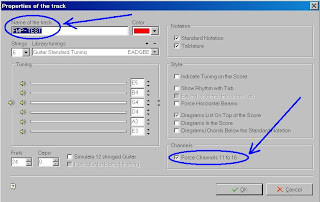
  • Important: name the track like this "FMP - " + "whatyouwant" (ex. "FMP - Track1")

  • Check the flag "Force Channels 11 to 16"
  • Click OK

  • Export to MIDI


That's it!

Play your MIDI exported file with M-Player, you will hear the sound and see on your Fretlight the notes lighted on in real time.


[Added: 14 July 2008]
Some people reported to me to receive error messages from M-Player similar to this: "Unable to load file.Automation error. The object invoked has disconnected from its clients".

I too experienced this kind of problems using latest M-Player version with Vista.

It seems it really depends on M-Player version.
Anyway, using Win2000 or WinXP with M-Player v1.2.5214 everything works fine.

If you have Win2000 or WinXP you can download this M-Player specific version from here:
http://www.francescograssi.com/public/download/fretlight/M-PlayerSetup_1.2.5214.exe

But if you want to avoid to downgrade M-Player, you can try this tip before:
  • once you have your MIDI file exported, open it with a pure MIDI editor and save it again as MIDI


It has been reported that this tip should be able to fix the problem.


Francesco Grassi

lunedì 3 marzo 2008

In volo con il Geonaute GPS Keymaze 300

Ho voluto testare il Keymaze 300 in volo.
Dal finestrino dell'aereo non ha avuto problemi a fare subito il fix e a tenerlo per tutto il tragitto, così mi sono divertito a tracciare le rotte del ritorno a Malpensa.


Da qui potete scaricare il file in formato kml compatibile con Google Earth per la visualizzazione:

Se avete installato Google Earth sul vostro PC, riuscirete a visualizzare il volo.


Francesco Grassi

lunedì 25 febbraio 2008

Geonaute GPS Keymaze 300

Come ottenere il profilo altimetrico?


Da qualche tempo utilizzo il Keymaze 300:
http://www.geonaute.com/IT/keymaze-300-19389541/


Uno dei punti negativi segnalati in vari forum è il fatto che il Keymaze 300 non salva l'altitudine, ma solo le coordinate.

Come tracciare quindi il profilo altimetrico?
Un modo semplice esiste, a patto che il percorso sia stato effettuato al suolo e non in volo.

Da questo sito:
http://www.gpsvisualizer.com/

si può raggiungere questa pagina:
http://www.gpsvisualizer.com/elevation


I dati esportati dal Keymaze 300 (GPX, KML, etc.) prima di essere eleborati, andranno convertiti opportunamente tramite la pagina:
http://www.gpsvisualizer.com/convert

Si riuscirà quindi a ricostruire automaticamente l'altitudine mancante a partire dalle coordinate esportate dal Keymaze 300 e sarà possibile quindi ottenere il profilo altimetrico anche in forma grafica.


Francesco Grassi